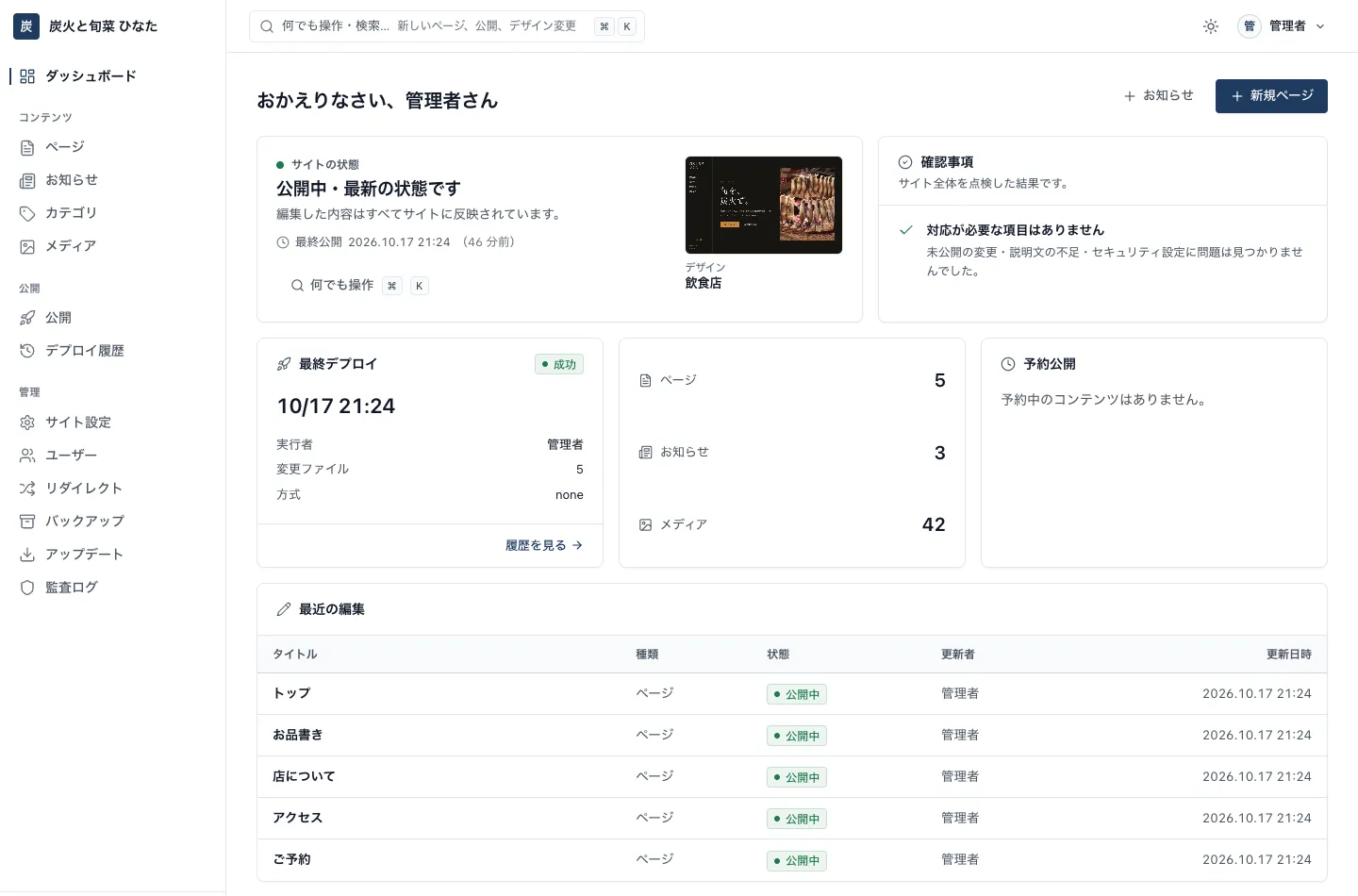
Whoever updates the site just edits the headings, text and photos, then clicks “Publish.” Only the exported HTML goes live; the public site has no PHP and no database. A website that is fast, resilient and a small target for attacks, on the shared hosting you already use.
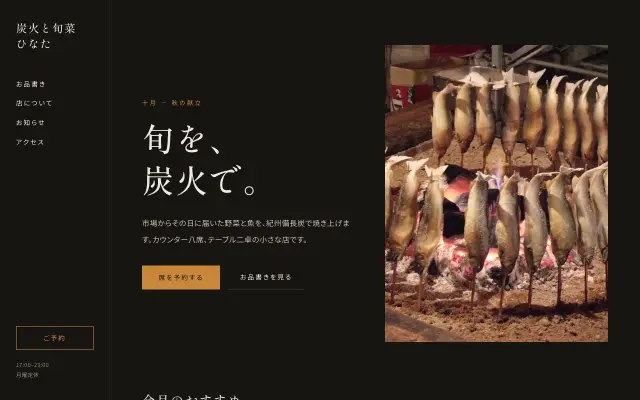
On the left, the admin panel; at the bottom right, an example of the published website.
00About us
Why we builtShirakaba CMS
We are “Hokkaido no WEB-ya,” a web studio based in Hokkaido, Japan, and we have worked on the web for 14 years. We build websites and stay with our clients through the problems that come after launch. Over those years, the job we have taken on most often is fixing WordPress.
179 sites repaired and restored after errors took them offline. 27 jobs bringing hacked sites back and removing malware. 33 WordPress migrations. For every client who came to us, it was sudden and serious.
With every recovery request, we knew the cause was the same. The admin panel, the core and the plugins all run on the same server as the pages visitors see. So the moment a plugin stops getting updates, the site becomes a target. Fixing sites one by one does not help; as long as that structure stays, the same thing will happen again.
Recent waves of unauthorized access have been genuinely hard on people. We wanted to do something about it, not just repair and move on. That is how this CMS began.
At the same time, most people who actually update a website do not write HTML for a living. What they really wanted was very simple.
“I just want to edit the headings, text and photos, safely.”
So we drew a clear line between roles. Editing happens in the admin panel. Only exported static HTML is published. The public pages have no PHP and no database, and no program runs when someone visits. We narrowed what needs protecting down to one place: the admin panel, behind a login.
“A website with no maintenance fees,” mobile sites for restaurants, multilingual QR mobile ordering for international visitors: we have turned the needs we see in our daily work directly into features. News, reservations, access and maps, page structures for each industry. Rather than adapting a foreign tool for Japan, we built this CMS in Japan from the ground up, around Japanese business practices.
We named it “Shirakaba,” the Japanese white birch, a tree of Hokkaido. Its trunk is white and grows straight, and it stands firm through heavy-snow winters. It is not showy, yet it quietly supports everyday updates. That is the kind of website we want to build.
A website should not be something you can only have by paying a lot to have it made. You should be able to build it yourself and keep it up to date yourself. That is why we built this CMS.
Websites that don’t break, from Sapporo.
Hokkaido no WEB-ya
Web and systems director / Based in Hokkaido / 14 years in the web industry 1,036 jobs completed on Coconala, rated 5.0 (Platinum rank)
01What is a CMS
Update your website as easily as editing a document.
A CMS (content management system) lets you change the text and photos on your website without technical knowledge. Just like writing an email or a blog post, you type in the admin panel, choose photos and click “Publish,” and the page is updated.
Without a CMS
Every change goes to a specialist
You want to change one line of your opening hours
You contact your web agency and wait for a quote
They rewrite the HTML (the code behind the page)
It goes live days later, and you pay every time
With a CMS
Do it yourself, the same day
Log in to the admin panel
Type directly where you want to make a change
For photos, just pick a new one
Click “Publish” and your website is updated right away
I
No HTML knowledge needed
The look is handled by a design that is polished from the start. Whoever updates the site can focus on headings, text and photos.
II
Anytime, as often as you like
News, menus, changes to opening hours. Update them yourself from a computer or phone whenever you need to.
III
Shirakaba CMS is one of them
WordPress is the best-known CMS. Among CMSs, Shirakaba CMS takes the approach of “publish only the exported pages,” which is hard to break and a small target for attacks (explained in the next section).
02Why static
Visitors only ever reach the exported HTML.
A typical dynamic CMS (such as WordPress) runs a program on the server to assemble the page on every visit. Shirakaba CMS exports the pages once, when you click Publish, and puts only the result on the public site.
Typical dynamic CMS
Everything on the public server
白樺 SHIRAKABA CMS
Public side and editing side, kept apart
I
A small attack surface
The public site holds only HTML, CSS and images. No program runs when visitors arrive, and there is no database to read from or write to.
II
Fast
Pages are exported when you publish. With nothing to assemble on each request, the server simply returns the files as they are.
III
Hard to break
The public site is unaffected by plugin updates or database trouble. Even while the admin panel is down for maintenance, your published pages stay online.
03Industry designs
Choose from 34 designs and start with a polished site.
Choose your industry and a design in the first-run wizard and you start with every page in place, from the home page to the company profile, access and news. All that is left is to swap in your own text and photos. You can pick designs with a different feel for the same industry, and there are also 5 designs for IT companies, 5 for fitness, nonprofits, events, personal portfolios and agriculture, and 4 blog designs that start with sample posts. New designs will be added through updates.
By industry (Standard)10 designs
By industry (Variations)10 designs
For IT companies5 designs
New industries5 designsNEW
For blogs4 designs
Colors, fonts and corner radius in the Customizer
Adjust your brand colors, fonts, button corner radius and more in the admin panel’s Customizer. No HTML or CSS required.
Sections tailored to your industry
Build pages by combining pre-designed sections such as hero, features, pricing, FAQ, staff, menu, stats, opening hours, gallery and call to action.
04The editing experience
Write,check, publish.That’s it.
No HTML needed: update your site the way you would edit any document. The design and layout are protected so they can’t break; you only touch the content.
1 Edit
Edit right on the page
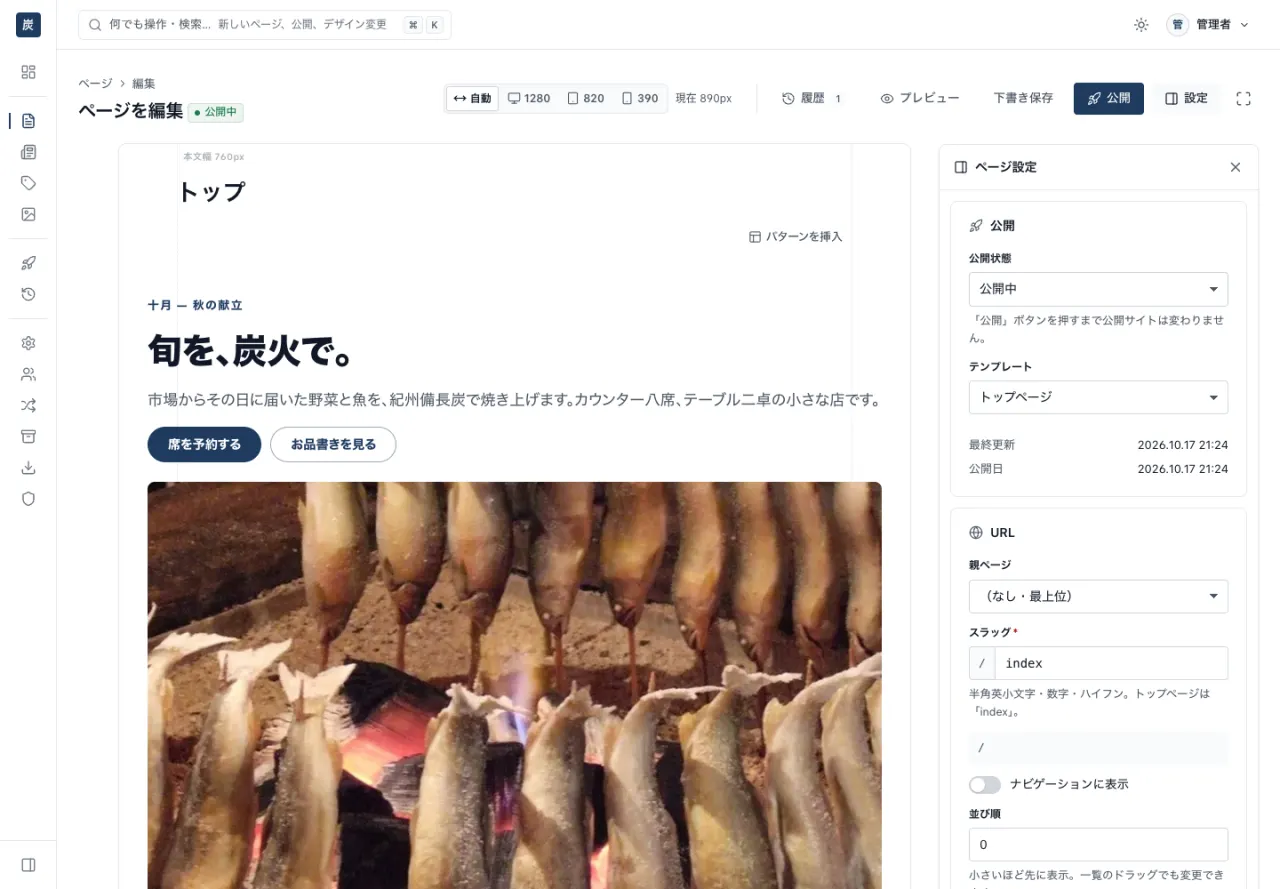
A block editor that feels like Notion. Click a heading or paragraph to rewrite it, choose photos, and drop in pre-designed sections. Move the mouse between two blocks and “+ Add a block here” appears, so you can insert one right at that spot. If someone else has the same page open, a banner at the top of the screen lets you know.
Block editor
Pre-designed sections
Revision restore
⌘K for everything
Add between blocks
Concurrent editing alerts
2 Preview
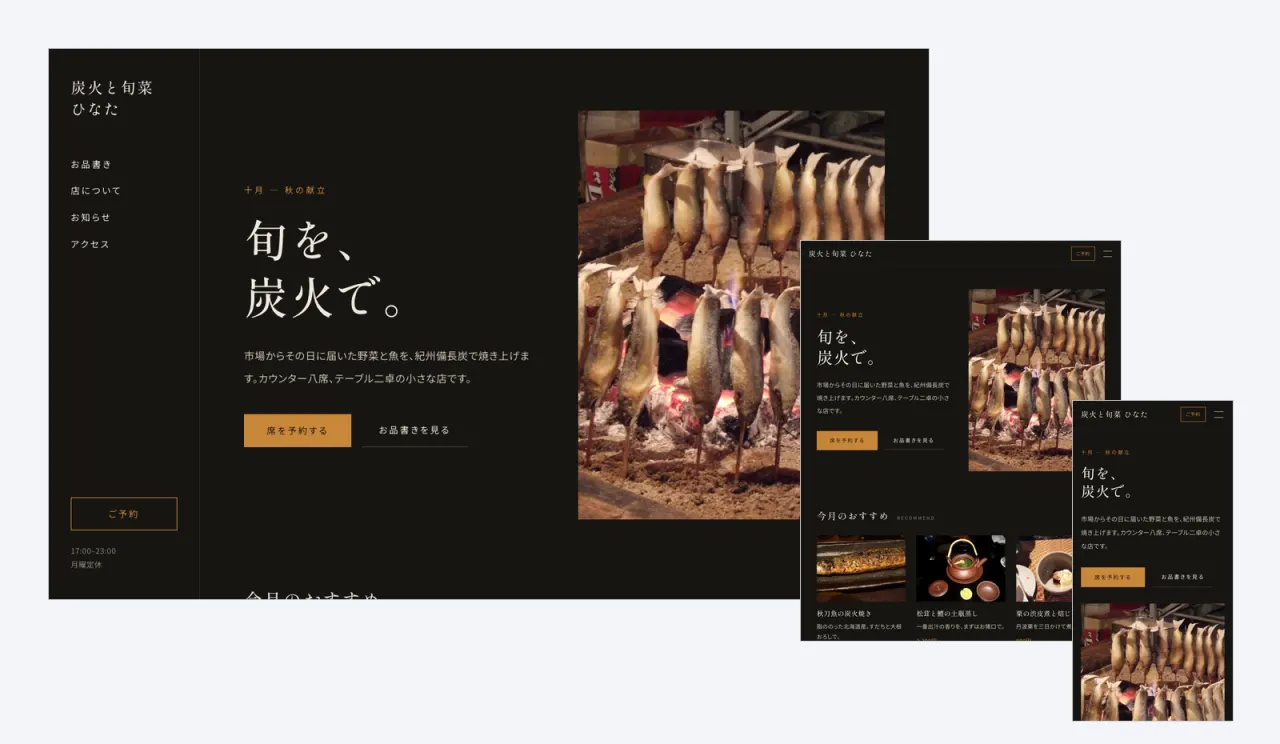
Check on desktop, tablet and mobile
Before publishing, check the result at three screen widths. Links inside the preview work too, so you can review across pages as you go.
Desktop / tablet / mobile
Clickable links
The “Restaurant” industry design shown at three screen widths
3 Publish
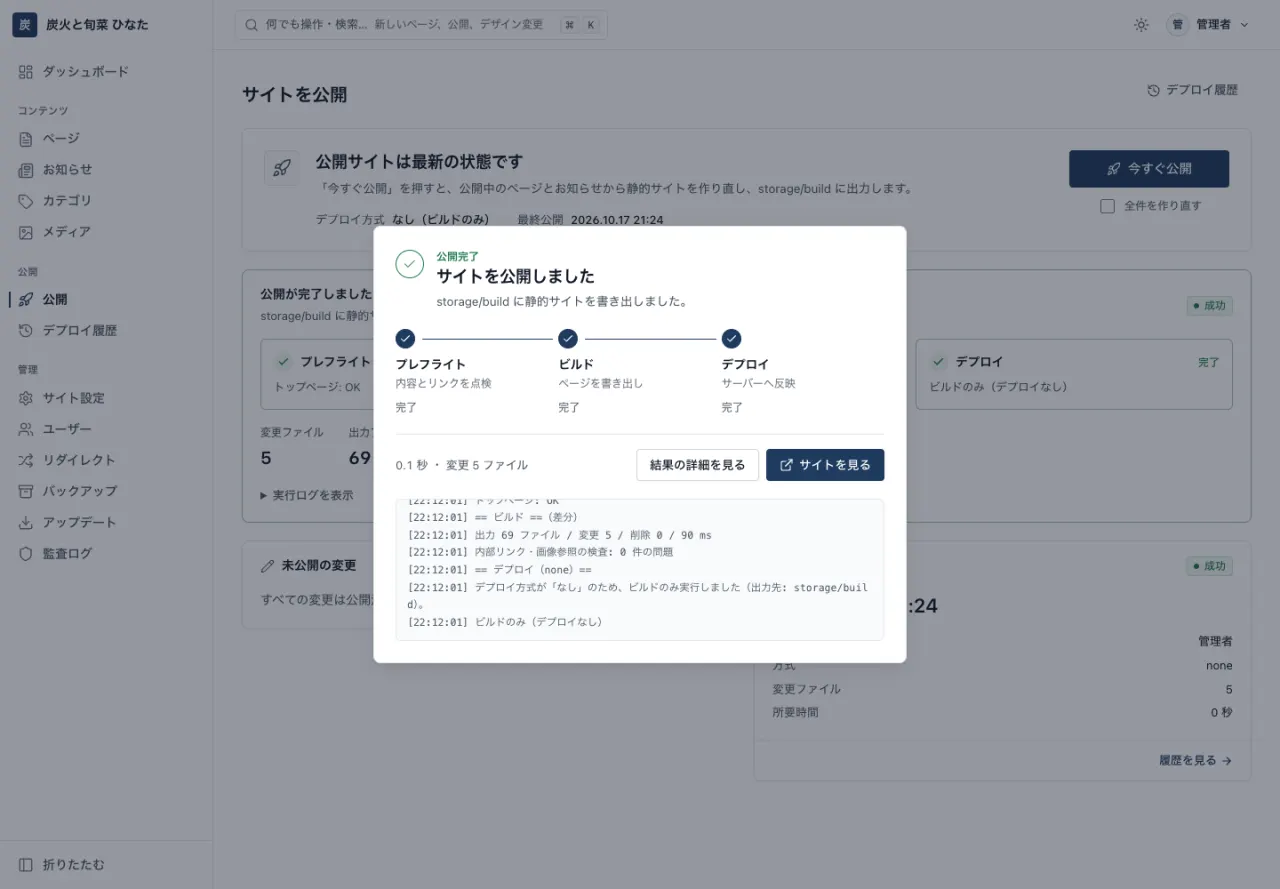
Click “Publish” for a static site
When you click Publish, the CMS checks your content, links and accessibility, exports only the pages that changed, and pushes them to your public site. Progress is shown on screen one stage at a time. Pages are also served so that browsers don’t keep old copies, so visitors see the new content right after you publish.
Publish button
Link and image checks
Export changes only
Accessibility check
05Features of Shirakaba CMS
The features we have built, listed as they are.
Not sales copy: this is a list of what you can use in the admin panel today.
01
Static HTML on the public side
The public site is just HTML, CSS and images, with no PHP and no database. Security headers for Cloudflare Pages (_headers) are exported automatically.
02
Three-factor login and audit log
Email + password + authenticator app (TOTP). Five failed attempts lock the account for 15 minutes. Every action in the admin panel is recorded in the audit log.
03
Block editor
Basic blocks and 23 pre-designed sections: hero / features / pricing / FAQ / staff / menu / stats / opening hours / image + text / gallery / steps / testimonials / call to action / news / cards / company history / client logos / access / notice box / conversation / comparison table / link list / table of contents. You can also choose variations with different layouts.
04
34 designs
25 industry designs, 5 for IT companies and 4 for blogs. Pick one and start with every page in place. Adjust colors, fonts, corner radius, hero and header in the Customizer.
05
From preview to publish
Preview on desktop / tablet / mobile, including unsaved changes, with working links. One Publish button takes you from build to live. Keeps 30 revisions, with diffs you can review before restoring.
06
Safe media uploads
Checks the actual MIME type and re-encodes images. Generates WebP in 3 sizes automatically, and flags images with no alt (alternative) text.
07
Upload the zip, then 5 steps
Open /cms/install/ and install in 5 steps. Publish to public_html on the same server, or to Cloudflare Pages.
08
One-click updates
Verifies the Ed25519 signature before applying, and rolls back automatically if anything fails. Choose from 3 update policies.
09
Everything you need to publish
Scheduled publishing, RSS, sitemap, OGP, automatic redirects when a URL changes, and daily backups.
10
Multilingual, and migration from WordPress
Admin panel in 7 languages, language switching on the public site (for international visitors), and migration from WordPress (XML / URL).
11
Runs on shared hosting
PHP 8.2+ and SQLite. No DB server needed, and it works even on servers where exec is disabled. Scheduled tasks run via web cron. On Xserver, paste your API key and register it with a single button.
12
Edit at the same width as the live page
The editor uses the same content width as the published page. Includes a focus mode and presets for desktop / tablet / mobile widths.
13
AI search optimization and AI writing assistance
Automatic llms.txt generation, structured data (JSON-LD), allow / block AI crawlers, a per-page “summary for AI,” and AI and SEO checks before publishing. Everything is exported as static files, with no external services required. Optional writing assistance runs on your own API key (off by default).
14
Blogging and Google AdSense
Switch post URLs to /blog/ and use it as a blog. Tags, monthly archives, table of contents, related posts, previous / next posts, author bio, and social share buttons (no external scripts). Connect Google AdSense by entering your publisher ID, then choose where ads appear (below the post title, within the post, in the sidebar, within lists and more) in the admin panel. ads.txt is exported automatically too.
15
Broken link check before publishing
Lists broken links and missing images page by page. Use “Check without publishing” to verify everything before you go live.
16
Review links to show your clients
Share unpublished pages through an expiring URL that can be viewed without logging in. It is not indexed by search engines, and you can revoke it at any time.
17
Forms with the fields you choose
Build booking requests, surveys, brochure requests and more by choosing the fields. View submissions in the admin panel and export them as CSV.
18
Email notifications for administrators
Get an email when a new version is released, when publishing fails, or when someone logs in from a new device.
19
Automatic social share images
For pages and posts without a specified image, a social share image is created automatically from the title and theme colors.
20
On-site search for your blog
Exports a static search page for your posts. It adds no server-side processing, and it searches without distinguishing between hiragana and katakana.
21
Reset for users who cannot log in
If a user loses their authenticator app, an administrator can re-enroll them from the admin panel. The user then sets it up again through an expiring, single-use link.
22
Google Forms in your site’s design
Just paste the URL of a Google Form: the questions are read in and a form that matches your site’s design is created. Responses arrive in Google Forms as usual, so there is no email sending to set up. You can also use it as the form on your contact page.
23
Only the designs you need, downloaded later
The CMS itself is distributed lightweight, and sample photos are downloaded from the official site only for the design you choose. They are imported only after their signature is verified, and progress is shown while they download.
24
Tamper detection and automatic restore
Each time you publish, the CMS records a “fingerprint” of every file on your site. It then compares them regularly, and if it finds a file that has been modified or deleted, or a file it does not recognize, it automatically restores the correct version, quarantines suspicious files instead of deleting them, and notifies the administrator by email. Even if your server is ever breached, this keeps the time visitors could see a tampered page to a minimum (when publishing to the same server).
25
Log in with a passkey
Log in with your fingerprint, face recognition or your device’s PIN. Passkeys hold up well against phishing, where a fake site tricks you into entering your password, and there is no more typing in a 6-digit code from an authenticator app.
26
Encrypted off-site backups
Daily backups are encrypted on your site’s side and then also sent to S3-compatible storage (such as AWS S3 or Cloudflare R2). Even if the whole server is lost, you can get your site back.
27
Approval workflow for publishing
Users with the “Author” role can only request publishing; changes go live once an administrator reviews the diff and approves them. Even when you let your clients update the site, nothing goes live without approval.
28
Unpublish date and time
Campaigns and limited-time announcements are automatically unpublished at the date and time you set.
29
External data transmission notice and consent banner
Automatically detects external services such as analytics, ads and videos, and creates an “External data transmission” page. For sites that need one, you can also show a banner that loads these services only after consent.
30
Business calendar
Set regular closing days, public holidays and temporary closures on a calendar, and a monthly calendar appears on your site. It is shown based on the day it is viewed, so there is no need to republish when the month changes.
31
Site-wide find and replace
Search the text of your pages, news posts and site settings for a word or phrase, and replace it everywhere at once. Before anything changes, you see a list of every place that will be replaced and can leave out any of them. Link URLs and images stay as they are, and the previous versions are kept in the revision history so you can restore them.
32
Concurrent editing alerts and overwrite protection
If someone else has the same page open, a banner at the top of the editor lets you know. If they saved first, the CMS never silently overwrites their work; instead, a confirmation screen lets you choose to reload, view the differences or overwrite.
33
Image cropping and rotation
Rotate, flip and crop images right in the Media screen. Pick a ratio from presets, including 1.91:1 for social share images. Even after overwriting an image, you can go back with “Restore pre-edit image,” or save the result as a new image instead. Processing happens on the server, and EXIF data such as location is removed.
34
Accessibility check before publishing
Every time you publish, the CMS automatically checks image alt text, heading order, vague link text such as “click here,” form labels, and the color contrast between text and background (WCAG contrast ratio), and tells you how to fix any issues it finds. It only warns you and never blocks publishing. Every bundled design meets these criteria out of the box.
35
Members-only and password-protected pages
Protect pages meant for business partners, staff and other limited audiences with Basic authentication. You can register multiple users and passwords for each protection group, and child pages are protected automatically. Protected pages are left out of search engines, the sitemap and llms.txt for AI. A “Verify protection” button lets you confirm that the lock is actually in place (when publishing to the same server, such as Xserver or Sakura Internet Rental Server).
36
Booking slots with live availability
Add a “Booking slot” field to a contact form, and visitors can choose an open date and time slot when they apply. It follows the business calendar’s closures, special opening days and shortened hours. The server processes requests one at a time, so bookings never exceed capacity, even when several arrive at once. Review bookings in a list in the admin panel, where you can cancel them or export them as CSV (when publishing to the same server).
06Security
No PHP and no database on the public side.
We narrowed what needs protecting down to the admin panel alone, and secured it with multiple layers of defense.
Email + password + authenticator app (TOTP), or a passkeyLogging in requires a one-time code from an authenticator app in addition to your password. You can also log in with a passkey that uses your fingerprint, face recognition or your device’s PIN.
CSRF protection and a strict CSPEvery action in the admin panel is verified with a token. The admin panel runs under a CSP that allows no inline scripts or styles at all.
Content checks and re-encoding for uploadsImages are identified by their actual content (MIME type), not their file extension, and re-encoded before being saved.
Audit logRecords who did what and when, including logins, publishing and settings changes.
Signed one-click updates with automatic rollbackUpdate files are applied only after their Ed25519 signature is verified. If something fails, the CMS automatically restores the previous state.
Tamper detection and automatic restoreRecords a “fingerprint” of every file each time you publish and compares them regularly. If it finds a file that has been modified or deleted, or a file it does not recognize, it automatically restores the correct version, quarantines suspicious files and notifies you by email.
Encrypted off-site backupsDaily backups are encrypted before they are sent and are also stored in S3-compatible storage. The passphrase needed to decrypt them is never kept on the server.
07Compared with other CMSs
What to look for: “easy to secure”and “easy to take with you.”
Here is how it compares with the CMSs and website builders people often weigh it against. Each has its strengths. Shirakaba CMS focuses on helping small businesses and shops run their site on their own server, safely, and at minimal cost.
Comparison of Shirakaba CMS with other CMSs and website builders
* A comparison based on typical use, using information published on each company’s official website and help pages as of October 2026. “—” marks items we could not confirm in official information. Pricing and features vary by plan and may change, so please check each company’s website for the latest details. All company and product names are trademarks of their respective owners.
When another option may suit you better
You want to add anything and everything with plugins → WordPress has the largest range of extensions and resources of any CMS.
You want to design freely from scratch → STUDIO and Wix let you lay out pages freely on screen.
You need just one page, today → Peraichi is great for putting together a single page quickly.
You run a large organization and need approval workflows → Movable Type has an extensive track record with corporate websites.
08Installation
On shared hosting, in 3 steps.
It runs on any shared hosting with PHP, such as Xserver, Sakura Internet Rental Server or Lolipop!. No database server to set up.
1
Upload the zip
Upload the distribution file (zip) to your server and extract it.
2
Open the installer
Open /cms/install/ in your browser and follow the web installer’s 5 steps to register an administrator.
3
Choose your industry and publish
Pick an industry design in the first-run wizard to start with every page in place. Polish the text and photos, then click “Publish.”
pdo_sqlite / gd / mbstring / fileinfo / json / openssl sodium recommended (used for signed updates; without it, the update feature is disabled)
Web server
Apache (mod_rewrite recommended, but works without it) or Nginx
Disk
200MB or more
Scheduled tasks
cron (CLI or web cron)
Database
SQLite (no DB server needed)
Tested on
Xserver (PHP 8.3, served from the same server) Local Apache + php-fpm (with exec disabled)
Publish to
public_html on the same server / Cloudflare Pages
Browsers for the admin panel
Latest Chrome / Edge / Safari / Firefox You can also edit from Safari / Chrome on a smartphone
What editors need
An email address and an authenticator app on their phone (such as Google Authenticator)
Languages
Admin panel: Japanese / English / Korean / Simplified Chinese / Traditional Chinese / Thai / Vietnamese Multilingual switching on the public site (language-specific URLs such as /en/)
10Multilingual and international visitors
For customers from abroad, and for your team, too.
The admin panel is available in 7 languages. A single public site can switch between multiple languages as well. Language-specific URLs and search engine settings (hreflang) are exported automatically.
Available now
Multilingual admin panelSo staff from other countries can update the site in their own language.
Language switching on the public siteOne site, multiple languages, for international visitors.
日本語JA
EnglishEN
한국어KO
简体中文ZH-CN
繁體中文ZH-TW
ภาษาไทยTH
Tiếng ViệtVI
11Ready for AI search
In the age of AI search, a site that gets found.
Alongside traditional search engines, search that uses AI to compile and present answers is spreading. Shirakaba CMS automatically exports the files needed to describe your site accurately to these systems, every time you publish.
Available now
PersonEditorEdits headings, text and photos
CMSShirakaba CMSExports on Publish
OutputStatic files
Static HTML
llms.txt
JSON-LD
ReachesSearch engines / AI searchRead your content and point people to it
AI search optimization (AIO / LLMO)
Automatic llms.txt generation
Structured data (JSON-LD) output: business, FAQ, opening hours, articles
Allow / block AI crawlers (such as GPTBot) with one click
A per-page “summary for AI”
AI and SEO checks before publishing: heading hierarchy, description, alt
Everything is exported as static files. No external services required.
AI writing assistance (optional)
Add your own API key (Claude / OpenAI / Gemini) to get suggestions for drafts, summaries, alt text, translations and edits
A person always reviews suggestions before they are used
Off by default. Anything sent to the AI is shown on screen before it is sent
12Running costs
What it really costs to keep a website running.
¥1,000+/month
Just your domain and shared hosting. Expect around ¥12,000–18,000 per year.
When you hire a web agency, you typically pay monthly maintenance fees on top of the initial build. Shirakaba CMS turns that “maintenance” part into something you can do yourself.
Estimated running costs for a website
Item
Initial
Per month
Per year
DomainSome offers include a free first year or free for life
From ¥0
About ¥80–340
.com ¥1,000–2,000 .jp ¥3,000–4,000
Shared hostingStandard tier. From around ¥700/month on a 36-month contract. Setup fees are usually ¥0
¥0
¥990–1,100
About ¥11,900–13,200
SSL (https)
¥0
¥0
¥0Free SSL
Shirakaba CMS
¥0
¥0
¥0
Design
¥0
¥0
¥0Choose from 34
Updates
¥0
¥0
¥0You update it yourself
Total
From ¥0
About ¥1,000–1,500/month
About ¥12,000–18,000/year
* Estimates based on prices published by each provider as of October 2026. Actual prices vary with promotions and contract length.
13FAQ
Frequently asked questions
What kind of server does it run on?
It runs on shared hosting with PHP 8.2 or later (such as Xserver, Sakura Internet Rental Server or Lolipop!). Data is stored in SQLite, so you don’t need a database server. You can publish to Cloudflare Pages or to public_html on the same server.
Can I update the site without knowing HTML?
Yes. Editors only touch headings, text, photos and the Publish button. With the block editor you rewrite content right on the page, preview it at desktop, tablet and mobile widths, and then publish. The design is protected so it can’t break.
Isn’t a static site a hassle to update every time?
You just click “Publish” in the admin panel. The CMS checks your content and links, exports only the pages that changed, and pushes them to your public site. If you want to go back to earlier content, restore it from a revision.
How are updates to the CMS itself handled?
Update with one click from the admin panel. Update files are applied only after their Ed25519 signature is verified, and if anything fails partway, the CMS automatically restores the previous state.
Is it really free? How is it funded?
Yes. There is no purchase price and no monthly fee for the CMS. It is funded by affiliate ads (referrals for domains and servers) in the website setup guide (Japanese). Ads are labeled “PR.” The license is free, including for commercial use (Terms of use (Japanese)). You can download it for free from the bottom of this page.
Is that really all it costs? Is there anything else to pay?
Besides your domain and shared hosting, you may have some costs in cases like these:
If you use an email delivery service (such as Resend) to send contact form messages. Some services offer a free tier.
If you buy paid stock photos or hire a photographer.
If you hire a professional for part of the work, such as writing content or initial setup.
When a domain or hosting promotion ends and regular renewal pricing applies.
Can I create pages that only business partners or staff can see?
Yes. You can put a Basic authentication password on any page. Each protection group can have multiple users and passwords, and child pages below a protected page are covered by the same protection. Protected pages are left out of search engines, the sitemap and llms.txt. This works when publishing to the same server, such as Xserver or Sakura Internet Rental Server.
Will edits clash when several people update the site?
If someone else has the same page open, a banner at the top of the editor lets you know. If they saved first, the CMS never silently overwrites their work; you can choose to reload, view the differences or overwrite. Even if you overwrite, the earlier content can be restored from the revision history.
Can I take bookings for my shop?
Yes. Add a “Booking slot” field to a contact form, and visitors can choose an open date and time slot when they apply. Available slots follow the business calendar’s closures, special opening days and shortened hours, and requests beyond capacity are not accepted. Review bookings in a list in the admin panel, where you can cancel them or export them as CSV. This works when publishing to the same server.
14Free download
Shirakaba CMS is free to download.
Upload cms.zip to your server’s public_html, extract it, and open https://your-domain/cms/install/. That’s all. The Xserver installation guide (Japanese) walks you through each step with screenshots. Feel free to get in touch with any questions or if you would like advice on getting started.
Need help with setup? The developer will install and configure it on Xserver for you (via Coconala, ¥3,500; building out your page content is an extra ¥10,000).